





Do you often feel overwhelmed by courses filled with too many scattered knowledge points while studying? When this happens, creating a clearly structured mind map is undoubtedly one of the best solutions.
A mind map is an efficient learning tool that helps quickly organize and summarize key information, making fragmented knowledge clear, visual, and easy to understand at a glance.
In this article, you will learn practical, step-by-step methods for Creating Mind Maps that truly enhance learning efficiency. Let’s get started.
What Are the Benefits of Creating Mind Maps for Learning Efficiency
Creating mind maps offers four significant advantages. Let’s explore how establishing Mind Maps can improve your learning efficiency.

1. Rapid information integration
When you organize scattered knowledge points around a central topic, such as historical timelines or biological classifications, mind maps quickly integrate fragmented information into a structured knowledge network, helping you understand the overall framework of a subject.
2. Visual knowledge structuring
By combining shapes, text, and other visual elements, mind maps transform complex knowledge systems into clear visual diagrams. This makes information easier to understand, remember, and apply, which is why Mind Map Applications are so popular in education.
3. Improved memory retention
Mind maps integrate text, images, and colors, activating multiple areas of the brain simultaneously. This multidimensional presentation strengthens memory retention and improves information recall.
4. Development of critical thinking
When creating a mind map, learners must analyze logical relationships between concepts, such as cause and effect or parallel structures, and visualize them using lines and connectors. This process reinforces logical reasoning and analytical skills.
Mind maps help learners systematize and structure knowledge, making it easier to identify key points and ultimately improving learning efficiency.
Next, let’s look at how to create one step by step.
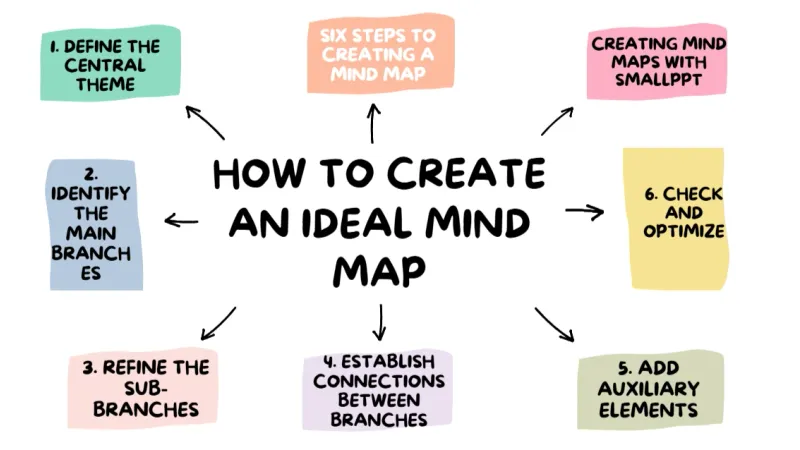
6 Steps to Creating a Mind Map

1. Define the central theme
First, determine the core topic of your mind map. This can be a chapter title, a specific concept, or a broader knowledge area. Place the central theme in the middle or at the top, bottom, left, or right of the page, ensuring there is enough space for branch expansion.
2. Identify the main branches
Based on the central theme, expand your thinking to identify important related concepts or keywords. These form the main branches of the mind map. Use thicker lines extending outward from the center and keep these branches broad and clearly categorized.
- For example, if your learning topic is “Brazilian Human Geography,” main branches might include “Geographical Location,” “Population and Culture,” “Economic Development,” and “Social Issues.”
3. Refine sub-branches
Add smaller branches to the main branches to include detailed knowledge points.
- For example, under the main branch “Population and Culture,” you can add sub-branches such as “Population Structure” and “Cultural Characteristics.”
4. Establish connections between branches
Use lines, arrows, or connectors to link main and sub-branches. You can label these connections to clarify relationships between knowledge points.
5. Add supporting elements
To make the mind map more engaging and memorable, add icons, symbols, or simple visual elements to highlight key information. However, avoid excessive colors to maintain clarity. This balance is especially important when using Free Mind Map Creation Tools.
6. Review and optimize
After completing the first draft, check for missing content and refine unclear structures or logical relationships. As your learning progresses, you can continue adding new information to the mind map.
Once you complete these 6 steps, you will have a well-structured and logically sound mind map. Try redrawing it from memory to reinforce learning.
What to Pay Attention to When Creating Mind Maps

1. Focus on purpose
The goal of a mind map is to improve learning efficiency and build a complete knowledge system, not to create something visually decorative but impractical. Avoid spending too much time on design details.
2. Keywords first
A mind map is not traditional note-taking. Use keywords instead of long sentences or paragraphs to maintain associative thinking.
3. Leave appropriate blank space
Avoid filling the entire page. Leaving space makes the layout cleaner and allows room for future additions.
4. Emphasize relationships between knowledge points
Branches should not exist in isolation. Actively look for relationships between concepts and represent them visually.
If hand-drawing mind maps takes too much time, using AI tools like Smallppt to generate mind maps is also an excellent option.
How to Create an Ideal Mind Map with Smallppt
Learning how to use the right tools is the first step toward improving learning efficiency. Smallppt is a powerful AI tool that effectively supports brainstorming and idea expansion. When you feel stuck or unsure how to extend branches, Smallppt can recommend relevant subtopics and related knowledge points using just a title.

1. AI mind map generation
Enter your topic, and the AI will automatically expand content branches, helping you generate a complete mind map quickly.
2. AI summarizer tool
When working with long documents, simply input text or links to extract key points, providing a solid foundation for Creating Mind Maps.
3. AI writing tool
Generate or rewrite content based on your input, reducing writing pressure and supporting efficient learning workflows.
After learning how to create mind maps through this guide, try applying the technique in your own studies. It not only improves efficiency but also deepens understanding.

With the help of Smallppt and Online Mind Mapping, enhancing learning ability and creativity becomes much easier. Reading is good, but practice is better. Let’s start now.
FAQs About Learning-Oriented Mind Maps
Q1. When the course content is extensive and complex, how can I define a clear central theme?
Focus on learning objectives. If the content is too broad, divide it by chapters or exam priorities and create separate mind maps for each subtopic.
Q2. I tend to write long sentences instead of keywords. How can I improve?
Follow the principle of one word, one core idea. Prioritize nouns and gerunds and remove unnecessary modifiers.
Q3. I struggle to find relationships between knowledge points. What should I do?
Start with basic logical relationships such as cause and effect, inclusion, or parallelism. If needed, use Smallppt, which can assist in identifying potential connections.
Q4. How much blank space should I leave in a mind map?
It is recommended to leave 30% to 50% blank space, prioritizing core and high-frequency knowledge points.
Q5. Can I adjust the structure after generating a mind map with Smallppt?
Absolutely. Mind maps generated by Smallppt allow direct adjustment of branch hierarchy, content order, and layout structure.
